
Tech
Under the hood
What aDJusted needs from your setup and how to set it up: audio device, timecode vinyl, library, stems and controllers.
Everything on this page is in the app's settings – the cog at the top right.
Setting up your audio device
aDJusted plays through any audio device macOS knows – from the Mac's headphone socket to a mixer with a built-in sound card.
- Output and timecode input
- In Settings → Audio & DVS you choose the output device and, for timecode vinyl, the input device. “Rescan devices” brings a device you just plugged in into the list.
- Mixing internally
- The app mixes and sends the stereo sum to the output; on a device with four output channels the cue goes to channels 3/4. The right choice for controllers that mix in software when connected to a computer – their channel strips are MIDI controls then.
- Mixing externally
- Every deck gets its own output pair (deck 1 → channels 1/2, deck 2 → 3/4 …), and a real mixer takes over gain, EQ, filter, faders, crossfader and cueing. This needs an output device with at least four channels; otherwise the app keeps mixing internally.
- Audio load
- Shows the longest measured compute time against the time allowed, and counts dropouts – each count is an audible click. If it clicks while the counter stays at zero, the cause is not CPU load.
- Input levels
- A meter per input channel shows what reaches the device before anything is decoded. If it stays silent while the turntable is running, nothing arrives at the chosen input – or the device does not pass its line inputs over USB at all.
Prepare at home. Working out stems and beatgrids for whole crates in advance takes everything the Mac has – the beatgrid analysis keeps about four cores busy. During a set, that is exactly the compute time the sound needs.
DVS: playing with timecode vinyl
Any deck can be driven from a turntable. The music comes from the Mac, your hand stays on the record.
What you need: turntables, control vinyl from Serato or Traktor Scratch, and an audio interface with four inputs – input and output on the same device.
In six steps
- Wire up. Turntable 1 into input 1/2, turntable 2 into input 3/4. A turntable belongs in a phono input, a CD player in line.
- Choose the device. In Settings → Audio & DVS, pick the same device as output and as timecode input. With two separate devices two clocks run against each other and the timecode jitters – an Aggregate Device in macOS's Audio MIDI Setup joins them. If you choose one of them on a different device, aDJusted asks and moves both together.
- Set record and speed. Control vinyl Serato (1 kHz carrier) or Traktor Scratch (2 kHz), and 33⅓ or 45 rpm. With the wrong speed a normally running record reads 1.35× – and the decks run too fast.
- Assign the decks. Input 1/2 plays deck A or C, input 3/4 deck B or D – so the back decks can run from vinyl too. If your interface has only one input pair, it may go to any of the four decks.
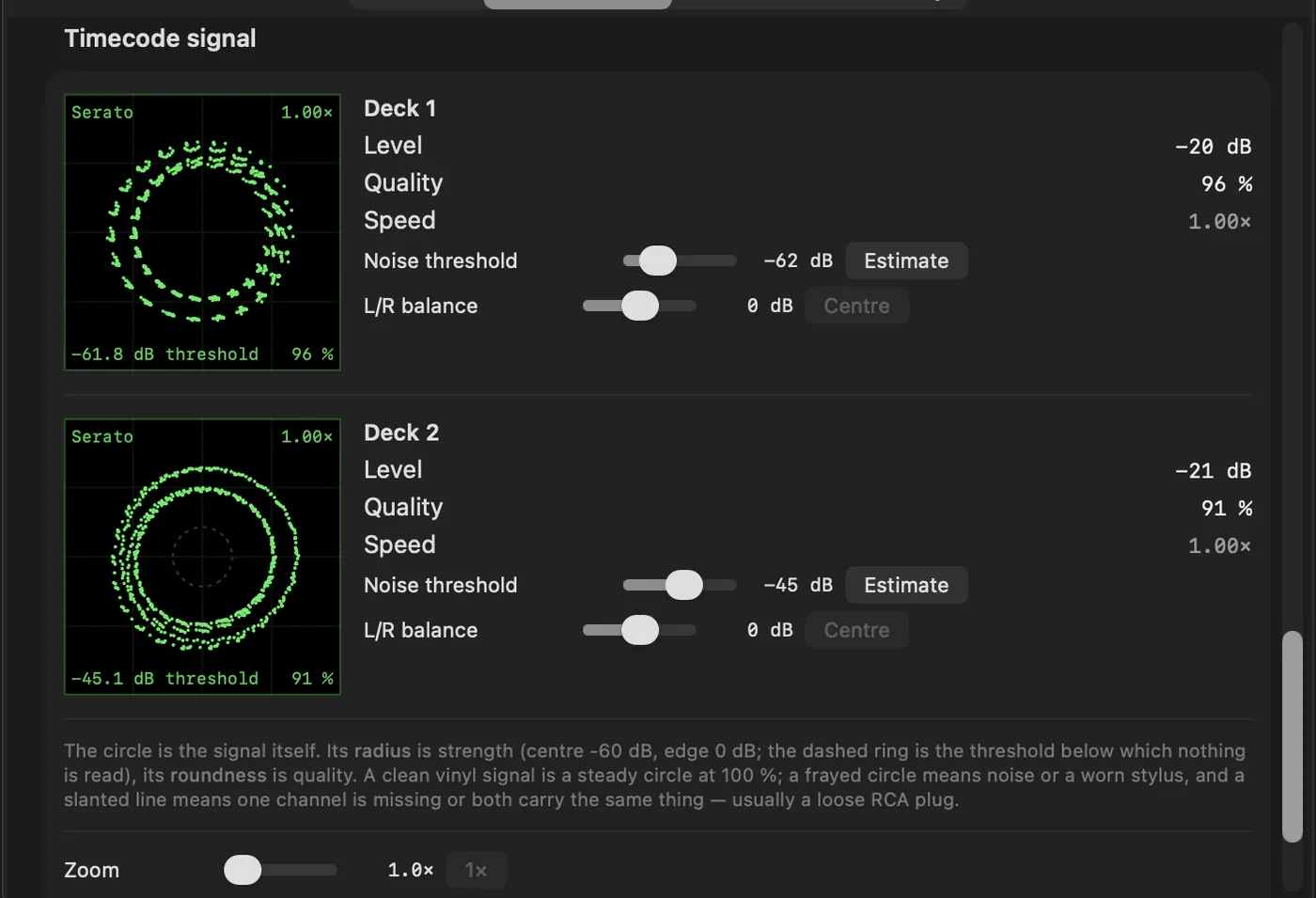
- Check the signal. Each deck's scope should show a steady, round circle (see Reading the scope). If the record plays backwards, “swap channels” fixes reversed RCA cables.
- Play. Switch the deck from INT to REL or ABS. The choice is kept for each deck across a restart; if aDJusted starts with no timecode input, remembered decks stay on INT until it is chosen again.
Joining two interfaces into one device (aggregate device)
When the timecode comes in on a different interface than the sound goes out on, macOS needs one device covering both – otherwise two clocks count independently, and that is exactly where the jitter comes from. macOS builds such a device itself: the Aggregate Device (in German since macOS 15 “Hauptgerät”).
- Open Audio MIDI Setup (Applications → Utilities, or via Spotlight) and show the device list on the left.
- Click + at the bottom left and choose “Create Aggregate Device”.
- In the list on the right, tick Use for both interfaces – first the one with the phono/line input, then the one for output. The order decides the channel numbers: the inputs of the first ticked interface become channels 1/2, the next one's 3/4. aDJusted reads deck 1 (or C) on 1/2 and deck 2 (or D) on 3/4.
- Set Clock Source to the interface the turntables are wired to: the timecode sets the beat.
- Tick Drift Correction for every other interface, but not for the clock source.
- Put both interfaces on the same sample rate (44.1 or 48 kHz). Mismatched rates are the most common reason an aggregate device clicks.
- Double-click the aggregate device to give it a name.
- In aDJusted, under Settings → Audio & DVS, pick that same aggregate device as output and as timecode input.
- A multi-output device is something else: it only fans out outputs and has no inputs at all – useless for DVS.
- An aggregate device rarely runs as tight as a single interface. If one interface can do input and output, it is the better choice.
- Unplug one of the interfaces and it drops out of the aggregate. After plugging it back in, check in Audio MIDI Setup that the tick is still there – otherwise it looks, from inside aDJusted, like a device with no signal.
The three modes
- INT
- The deck plays from the app as usual.
- REL – relative
- The record sets speed and direction; where the needle lands does not matter. When the needle runs into the lead-out groove, the deck switches to INT and carries on at the speed the record was turning – the mix holds. Put the needle back at the start of the record with it running and the deck returns to REL by itself, following the record again; put down in the middle, it stays on INT. If aDJusted loses the spot on the record while you scratch and finds it somewhere else, the track carries on without a jump.
- ABS – absolute
- Like REL, plus the position: drop the needle in the middle of the record and the track jumps there. A knock that throws the needle back a groove does not knock the track out of time. Hold the record and let it go again at the same spot and the track stays where it was – only a needle that lands somewhere else counts as a new position. This needs a position signal on the record – the Serato record has one, the Traktor record does not; then ABS behaves like REL. In ABS nothing jumps at the press of a button: the needle sets the position, so hot cue pads, the CUE button and saved loops trigger no jump. The pads still light up and an empty pad sets a cue; to jump, switch to REL.
Reading the scope
In Settings → Audio & DVS every deck shows its timecode signal as a circle. The radius is the level, the roundness the quality. Aim for close to 100 % – below 85 % you may run into trouble.
| What you see | Cause | Fix |
|---|---|---|
| Steady, closed circle with several rings | All good – the rings are the record's position data. | – |
| Nothing at all | Nothing reaches the input. | Check cables and plugs; swap the RCA cables if need be. |
| Very small circle close to the threshold | Turntable in a line input – about 40 dB too quiet. | Switch the input to phono. |
| Circle breaks out past the edge | CD player in a phono input – far too loud. | Switch the input to line. |
| Horizontal or vertical line | One channel carries nothing. | Check the RCA connection and the tonearm wiring. |
| Diagonal line through the centre | Both channels carry the same signal. | Check the wiring; if it persists, it is the turntable. |
| Slanted ellipse | Crosstalk: one channel bleeds into the other. | Check the RCA connections, move away from large power consumers. |
| Round circle with gaps | Dust on the stylus or the record. | Clean stylus and record. |
| Gaps and outliers | A damaged spot on the record or a worn stylus. | Try another part of the record; otherwise replace record or stylus. |
| Restless, wobbling circle | Vibration: the bass makes the needle jump. | Move the turntables away from the speakers. |
| Heavily distorted, wandering picture | Turntable not grounded. | Connect the ground wire. |
Fine-tuning: the noise threshold (−48 dB by default) sets the level from which anything counts as signal; “Estimate” sets it 12 dB above your setup's noise floor while the record stands still. L/R balance (±6 dB) turns an ellipse back into a circle when the channels are unevenly loud. Buffer: In Settings → Audio the buffer size can be chosen per audio device – smaller means less time between record and sound and more load; if it crackles, go one size up.
Measured delay
Measured on 23 October 2026 on a Pioneer DJM-S11 over USB, from the timecode at the input to the sound at the output: 11.5 ms with a buffer of 64 frames, 14.7 ms at 128 and 29.7 ms at 512 – the size macOS usually sets. About 4 ms of that is aDJusted itself; the rest is the buffer and the way through the mixer. Another mixer and another Mac come to other numbers, and a small buffer wants room: with keylock and stems, rather 128 frames or more.
Library: four sources
aDJusted imports nothing and copies nothing. Switch each source on separately in Settings → Library; a track shows up once, even when several sources know it.
- Music app
- The playlists and folders of your library. Purchased tracks and your own files load. Tracks from an Apple Music subscription are copy-protected – aDJusted cannot reach their audio.
- Serato crates
- Serato's crates, read straight from disk and nested as in Serato.
- rekordbox
- The XML export with playlists and folders, BPM, key, hot cues and beatgrids. Choose it once; it is read again at every launch. To make it, in rekordbox: File → Export Collection in xml format. rekordbox's database and OneLibrary sticks are encrypted, and aDJusted deliberately does not read them.
- Your own crates
- Folders and crates you create in the app and fill by drag and drop. Only references to the files are stored.
- Other sources are left alone. What you correct in aDJusted is never written back into Serato's tags, the rekordbox export or the Music app.
- Back to rekordbox. Right-click a crate → “Export for rekordbox …” writes a rekordbox.xml with BPM, key, hot cues with their colours and the beatgrid – from there it goes onto a USB stick for CDJ and XDJ as usual.
- Prepare whole crates. Right-click a playlist or crate to separate every track into stems or work out its beatgrids – one track after another, cancel any time.
- Key comes from existing tags by Serato, Mixed In Key or the Music app, and those are left as they are. Where there is none, aDJusted works it out from the sound – not as accurately as a Mixed In Key tag.
Stems
aDJusted splits a track into drums, bass, vocals and everything else – on your Mac's own graphics chip, with no internet connection and no upload.
- Time
- On M2 or newer about a quarter of the playing time – roughly a minute and a half for five minutes of music. The first track after launch takes nearly twice as long.
- On load
- Out of the box a track is separated when you load it. Playback starts straight away; the stem pads light up once the separation is done.
- Echo when switched off
- A stem you switch off with MUTE plays on for 0.8 seconds and then dies away in an eighth-note echo – no hard cut in the middle of a bar. It can be turned off per stem in Settings → "Stems: echo when switched off"; solo always cuts the others at once.
- Thoroughness
- Thorough (the default), Balanced (about 8 % faster) or Fast (about 14 % faster) – in Settings → Library.
- Cache
- Separated parts are stored on the Mac, losslessly compressed, at about 40 MB per minute of audio. The limit ranges from 10 GB to unlimited, 50 GB by default; when it is reached, what has not been played for longest goes first.
iPad as a remote
The companion app aDJusted Remote turns an iPad into a mixer, controller and browser for aDJusted on the Mac.
- Switching it on
- In Settings → Controller, switch on “Offer as a mixer for iPad” and open the app on the iPad. Both devices need to be on the same network and allow local network access once.
- Mixer
- Crossfader, channel faders, gain, EQ, filter, cue, master with level meter, headphone mix and crossfader curve – what you move on the iPad moves on the Mac and the other way round.
- Jog wheels
- In the two-deck view: touch the top to stop playback and scratch while turning, turn the rim for a tempo nudge that fades out on its own. Above them title and artist, below the waveform – a tap jumps there.
- Decks
- Pitch fader with the range set on the Mac, live BPM, play, CUE and SYNC, auto loop, hot cue and stem pads and the three effect slots per deck.
- Browser
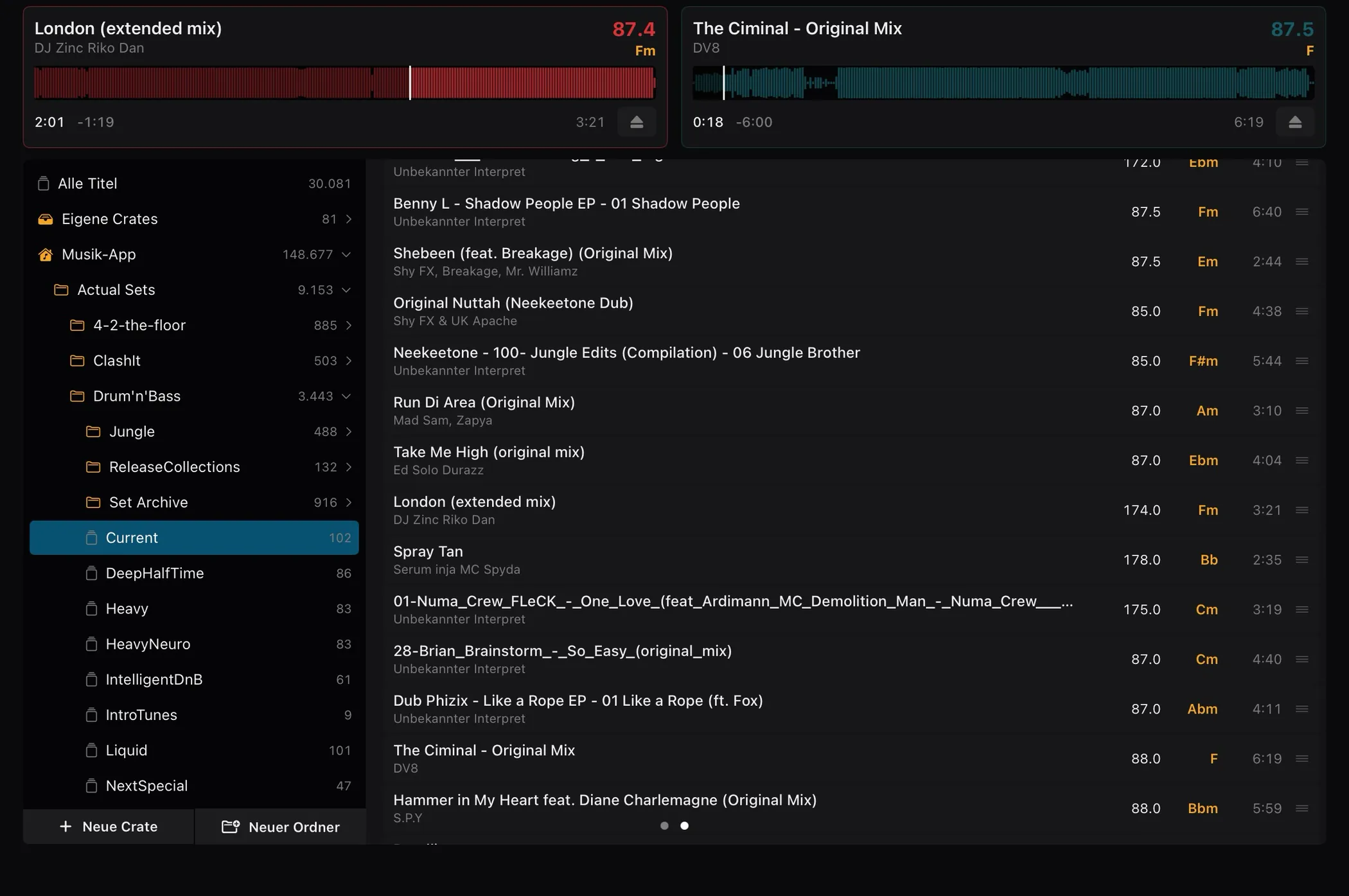
- Swipe left: decks 1 and 2 as tiles, below them the Mac's crate tree and the track list with BPM, key and length. Drag a track onto a tile to load it; new crates of your own can be created and filled right from the iPad.
- Four decks
- When decks 3 and 4 are showing on the Mac, the iPad switches to a compact four-deck mixer view.
Good to know: the connection is encrypted and stays on the local network. Once switched on, aDJusted announces itself there under your Mac's name, and while no iPad is connected it accepts the first connection – so on a network shared with strangers, switch it on only when you need it. More in the app's privacy policy.
MIDI controllers
Any MIDI controller can be taught to aDJusted. For many of them the app brings a ready-made mapping.
- Mappings that come with the app
- On first launch aDJusted asks which devices you want mappings for, with the one that is plugged in already ticked. Later, the same list is under Settings → Controller. What you have taught at the device is never overwritten without asking.
- Mapping wizard
- Walks you through every action one by one, with a “Learn” button and a live preview of the value the controller is sending. Single controls are quicker to fix straight in the list.
- Bluetooth controllers
- From aDJusted 0.6.4 you can pair controllers that send MIDI over Bluetooth – such as the Numark Mixtrack Go: put the controller in Bluetooth mode, click “Connect Bluetooth controller …” in Settings → Controller and pick the device. Once paired it behaves as over USB and uses the same mapping. Bluetooth carries the controls only, no sound. The sound comes through the audio device set in Settings → Audio & DVS – another controller, the Mac itself or an external sound card.
- Schema
- A clickable picture of the controller: click a control, see its actions and the MIDI address it learned, teach it again. A green line means taught.
- Passing it on
- A mapping is a single file. “Save to the Downloads folder”, then “Load …” on the second Mac – or send it to us, and we ship it with the next update for everyone with that device.
Controller displays are not supported yet. The protocols that drive jog wheel and browser displays are only made available by the makers to their official hardware partners. We have reached out to the makers so that aDJusted can drive these displays officially in future. Buttons, knobs, faders and jog wheels work over MIDI as usual regardless.
Controller list
Every controller we know of – including those without a mapping yet.
| Akai Pro AMX | No | Yes | – | – |
|---|---|---|---|---|
| Allen & Heath Xone:43C | No | Yes | – | – |
| Allen & Heath Xone:DB2 | No | Yes | – | – |
| Allen & Heath Xone:DB4 | No | Yes | – | – |
| Allen & Heath Xone:K3 | No | Yes | – | – |
| Allen & Heath Xone:PX5 | No | Yes | – | – |
| AlphaTheta CDJ-3000X | Yes | Yes | Partly | Official |
| AlphaTheta DDJ-GRV6 | Yes | Yes | No, draft | Official |
| AlphaTheta DJM-V5 | No | Yes | – | – |
| AlphaTheta Euphonia | No | Yes | – | – |
| AlphaTheta OMNIS-DUO | Yes | Yes | No, draft | Official |
| AlphaTheta XDJ-AN | No | Yes | – | – |
| AlphaTheta XDJ-AZ | Yes | Yes | No, draft | Official |
| Denon DJ DS1 | No | Yes | – | – |
| Denon DJ LC6000 | No | Yes | – | – |
| Denon DJ MC2000 | No | Yes | – | – |
| Denon DJ MC4000 | No | Yes | – | – |
| Denon DJ MC6000MK2 | Yes | Yes | No, draft | Official |
| Denon DJ MC7000 | Yes | Yes | No, draft | Hand |
| Denon DJ MCX8000 | Yes | Yes | Yes | Hand |
| Denon DJ PRIME 4 / 4+ | No | Yes | – | – |
| Denon DJ Prime Go+ | No | Yes | – | – |
| Denon DJ SC Live 2 | No | Yes | – | – |
| Denon DJ SC Live 4 | No | Yes | – | – |
| Denon DJ X1800 PRIME | No | Yes | – | – |
| Denon DJ X1850 PRIME | No | Yes | – | – |
| Gemini Slate | No | Yes | – | – |
| Gemini Slate 4 | No | Yes | – | – |
| HeadacheSound OMNI | Yes | No | Partly | Hand |
| Hercules DJ Control Air | No | Yes | – | – |
| Hercules DJControl Inpulse 200 | Yes | Yes | No, draft | Hand + official |
| Hercules DJControl Inpulse 200 MK2 | No | Yes | – | – |
| Hercules DJControl Inpulse 200 MK3 | No | Yes | – | – |
| Hercules DJControl Inpulse 300 | Yes | Yes | No, draft | Hand + official |
| Hercules DJControl Inpulse 300 MK2 | No | Yes | – | – |
| Hercules DJControl Inpulse 500 | Yes | Yes | No, draft | Hand |
| Hercules DJControl Inpulse T7 | No | Yes | – | – |
| Hercules DJControl Instinct | No | Yes | – | – |
| Hercules DJControl Instinct P8 | No | Yes | – | – |
| Hercules DJControl Jogvision | No | Yes | – | – |
| Hercules DJControl Starlight | No | Yes | – | – |
| Hercules DJControl T10 | No | Yes | – | – |
| iCON iDJ | No | Yes | – | – |
| Korg KAOSS DJ | Yes | Yes | Yes | Hand |
| Mixars DUO | Yes | Yes | No, draft | Official |
| Mixars PRIMO | No | Yes | – | – |
| Mixars QUATTRO | No | Yes | – | – |
| MWM Phase Essential | No | No | Yes | – |
| Native Instruments Traktor Kontrol F1 | No | Yes | – | – |
| Native Instruments Traktor Kontrol S2 MK2 | No | Yes | – | – |
| Native Instruments Traktor Kontrol S2 MK3 | No | Yes | – | – |
| Native Instruments Traktor Kontrol S3 | No | Yes | – | – |
| Native Instruments Traktor Kontrol S4 | No | Yes | – | – |
| Native Instruments Traktor Kontrol S4 MK2 | No | Yes | – | – |
| Native Instruments Traktor Kontrol S4 MK3 | No | Yes | – | – |
| Native Instruments Traktor Kontrol S8 | No | Yes | – | – |
| Native Instruments Traktor Kontrol X1 | No | Yes | – | – |
| Native Instruments Traktor Kontrol X1 MK2 | Yes | No | Yes | Hand |
| Native Instruments Traktor Kontrol X1 MK3 | No | Yes | – | – |
| Native Instruments Traktor Kontrol Z1 | Yes | Yes | Yes | Hand |
| Native Instruments Traktor Kontrol Z2 | No | Yes | – | – |
| Novation Dicer | Yes | Yes | No, draft | Hand |
| Novation Twitch | No | Yes | – | – |
| Numark DJ2GO2 | No | Yes | – | – |
| Numark DJ2GO2 Touch | No | Yes | – | – |
| Numark MixDeck | No | Yes | – | – |
| Numark MixDeck Express | No | Yes | – | – |
| Numark MixDeck Quad | No | Yes | – | – |
| Numark MixStream Pro / Pro+ | Yes | Yes | No, draft | Hand |
| Numark MixStream Pro GO | No | Yes | – | – |
| Numark MixTrack Edge | No | Yes | – | – |
| Numark MixTrack Go | Yes | Yes | Yes | Hand |
| Numark MixTrack Platinum | No | Yes | – | – |
| Numark MixTrack Platinum FX | No | Yes | – | – |
| Numark MixTrack Pro | No | Yes | – | – |
| Numark MixTrack Pro FX | No | Yes | – | – |
| Numark MixTrack Pro II | No | Yes | – | – |
| Numark MixTrack Pro III | No | Yes | – | – |
| Numark MixTrack Quad | No | Yes | – | – |
| Numark N4 | No | Yes | – | – |
| Numark NDX500 | No | Yes | – | – |
| Numark NS4FX | No | Yes | – | – |
| Numark NS6 | No | Yes | – | – |
| Numark NS6II | No | Yes | – | – |
| Numark NS7 | No | Yes | – | – |
| Numark NS7II | No | Yes | – | – |
| Numark NS7III | No | Yes | – | – |
| Numark NV | No | Yes | – | – |
| Numark NVII | No | Yes | – | – |
| Numark Party Mix | No | Yes | – | – |
| Numark Party Mix II | No | Yes | – | – |
| Numark Party Mix III | No | Yes | – | – |
| Numark Party Mix Live | No | Yes | – | – |
| Numark Party Mix Pro | No | No | – | – |
| Numark Scratch | No | Yes | – | – |
| Numark V7 | No | Yes | – | – |
| Pioneer DJ CDJ-3000 | Yes | Yes | No, draft | Official |
| Pioneer DJ DDJ-1000 | No | Yes | – | – |
| Pioneer DJ DDJ-1000SRT | Yes | Yes | No, draft | Official |
| Pioneer DJ DDJ-200 | Yes | Yes | No, draft | Official |
| Pioneer DJ DDJ-400 | Yes | Yes | No, draft | Hand |
| Pioneer DJ DDJ-800 | No | Yes | – | – |
| Pioneer DJ DDJ-ERGO | No | Yes | – | – |
| Pioneer DJ DDJ-FLX10 | Yes | Yes | Yes | Hand |
| Pioneer DJ DDJ-FLX2 | Yes | Yes | No, draft | Official |
| Pioneer DJ DDJ-FLX4 | Yes | Yes | No, draft | Hand |
| Pioneer DJ DDJ-FLX6 | Yes | Yes | No, draft | Official |
| Pioneer DJ DDJ-REV1 | No | Yes | – | – |
| Pioneer DJ DDJ-REV5 | No | Yes | – | – |
| Pioneer DJ DDJ-REV7 | No | Yes | – | – |
| Pioneer DJ DDJ-RR | No | Yes | – | – |
| Pioneer DJ DDJ-RX | No | Yes | – | – |
| Pioneer DJ DDJ-RZ | No | Yes | – | – |
| Pioneer DJ DDJ-RZX | No | Yes | – | – |
| Pioneer DJ DDJ-S1 | Yes | Yes | No, draft | Hand |
| Pioneer DJ DDJ-SB | Yes | Yes | No, draft | Official |
| Pioneer DJ DDJ-SB2 | Yes | Yes | No, draft | Hand |
| Pioneer DJ DDJ-SB3 | Yes | Yes | No, draft | Hand |
| Pioneer DJ DDJ-SP1 | Yes | Yes | No, draft | Hand |
| Pioneer DJ DDJ-SR | Yes | Yes | No, draft | Official |
| Pioneer DJ DDJ-SR2 | Yes | Yes | No, draft | Official |
| Pioneer DJ DDJ-SX | Yes | Yes | No, draft | Hand |
| Pioneer DJ DDJ-SX2 | Yes | Yes | Yes | Hand |
| Pioneer DJ DDJ-SX3 | Yes | Yes | No, draft | Official |
| Pioneer DJ DDJ-SZ | Yes | Yes | No, draft | Hand |
| Pioneer DJ DDJ-SZ2 | Yes | Yes | No, draft | Official |
| Pioneer DJ DDJ-T1 | No | Yes | – | – |
| Pioneer DJ DDJ-WeGO | No | Yes | – | – |
| Pioneer DJ DDJ-WeGO3 | No | Yes | – | – |
| Pioneer DJ DDJ-XP1 | No | Yes | – | – |
| Pioneer DJ DDJ-XP2 | No | Yes | – | – |
| Pioneer DJ DJM-250MK2 | No | Yes | – | – |
| Pioneer DJ DJM-450 | No | Yes | – | – |
| Pioneer DJ DJM-750MK2 | No | Yes | – | – |
| Pioneer DJ DJM-850 | No | Yes | – | – |
| Pioneer DJ DJM-900NXS | No | Yes | – | – |
| Pioneer DJ DJM-900NXS2 | No | Yes | – | – |
| Pioneer DJ DJM-900SRT | No | Yes | – | – |
| Pioneer DJ DJM-A9 | No | Yes | – | – |
| Pioneer DJ DJM-S11 | Yes | Yes | Yes | Official |
| Pioneer DJ DJM-S3 | No | Yes | – | – |
| Pioneer DJ DJM-S5 | No | Yes | – | – |
| Pioneer DJ DJM-S7 | Yes | Yes | No, draft | Official |
| Pioneer DJ DJM-S9 | Yes | Yes | No, draft | Official |
| Pioneer DJ DJM-T1 | Yes | Yes | Yes | Official |
| Pioneer DJ DJM-V10 | No | Yes | – | – |
| Pioneer DJ OPUS-QUAD | Yes | Yes | No, draft | Official |
| Pioneer DJ XDJ-700 | Yes | Yes | No, draft | Official |
| Pioneer DJ XDJ-RR | No | Yes | – | – |
| Pioneer DJ XDJ-RX | No | Yes | – | – |
| Pioneer DJ XDJ-RX2 | No | Yes | – | – |
| Pioneer DJ XDJ-RX3 | Yes | Yes | Yes | Hand |
| Pioneer DJ XDJ-XZ | Yes | Yes | No, draft | Official |
| Rane FOUR | No | Yes | – | – |
| Rane MP2015 | No | Yes | – | – |
| Rane ONE | No | Yes | – | – |
| Rane ONE MKII | No | Yes | – | – |
| Rane PERFORMER | No | Yes | – | – |
| Rane SEVENTY | Yes | Yes | No, draft | Hand |
| Rane SEVENTY A-Trak Edition | No | Yes | – | – |
| Rane SEVENTY-TWO | No | Yes | – | – |
| Rane SEVENTY-TWO MKII | No | Yes | – | – |
| Rane Sixty-Eight | No | Yes | – | – |
| Rane Sixty-Four | No | Yes | – | – |
| Rane Sixty-One | No | Yes | – | – |
| Rane Sixty-Two | No | Yes | – | – |
| Rane SL2 | No | No | – | – |
| Rane SL3 | No | Yes | – | – |
| Rane SL4 | No | No | – | – |
| Rane SYSTEM ONE | No | Yes | – | – |
| Rane TTM57mkII | No | Yes | – | – |
| Reloop Beatmix 2 | No | Yes | – | – |
| Reloop Beatmix 2 MK2 / 4 MK2 | Yes | Yes | No, draft | Hand + official |
| Reloop Beatmix 4 | No | Yes | – | – |
| Reloop Beatpad | Yes | Yes | No, draft | Hand |
| Reloop Beatpad 2 | No | Yes | – | – |
| Reloop Buddy | No | Yes | – | – |
| Reloop Elite | No | Yes | – | – |
| Reloop Flux | No | Yes | – | – |
| Reloop Flux GO | No | No | – | – |
| Reloop Mixon 4 | No | Yes | – | – |
| Reloop Mixon 8 Pro | Yes | Yes | Yes | Hand |
| Reloop Neon | Yes | Yes | Partly | Hand |
| Reloop Ready | No | Yes | – | – |
| Reloop RMX-90 DVS | No | Yes | – | – |
| Reloop Terminal Mix 2 | No | Yes | – | – |
| Reloop Terminal Mix 4 | No | Yes | – | – |
| Reloop Terminal Mix 8 | No | Yes | – | – |
| Roland DJ-202 | No | Yes | – | – |
| Roland DJ-505 | No | Yes | – | – |
| Roland DJ-707M | No | Yes | – | – |
| Roland DJ-808 | No | Yes | – | – |
| Roland SP-404 MKII | No | Yes | – | – |
| Stanton SCS.4DJ | No | Yes | – | – |
| Vestax Typhoon | No | Yes | – | – |
| Vestax VCI-100MKII | No | Yes | – | – |
| Vestax VCI-300 | No | Yes | – | – |
| Vestax VCI-380 | No | Yes | – | – |
| Vestax VCI-400 | No | Yes | – | – |
- MIDI mapping
- aDJusted brings a mapping for the device.
- Schema
- There is a clickable schema of the device.
- Checked at the device
- Yes: taught at the real device. Partly: used at the device and corrected, but not every assignment checked yet. No, draft: the mapping has never run on the hardware – a starting point, not a promise that every control is right.
- Source
- Official: read from the maker's MIDI list. Hand: taught at the device, derived from publicly known hardware facts or taken from a freely available mapping. Hand + official: derived and corrected against the maker's list.
Your controller is missing or has no mapping yet? Teach it with the wizard and send us the file – the mapping then ships with the next update for everyone.
Send a mappingProduct and company names belong to their respective owners. aDJusted is not affiliated with, endorsed or checked by any of the makers named.